Automatic switching
Handle up to 10 speakers and switch the assigned vMix shot from microphone activity, with adjustable reaction time, hold time and minimum shot duration.
vMix camera automation
Auto Camera switches cameras according to the person currently speaking. Full functionality is free with no time limit for non-commercial use and testing. A paid subscription is required only for commercial use.
How it works
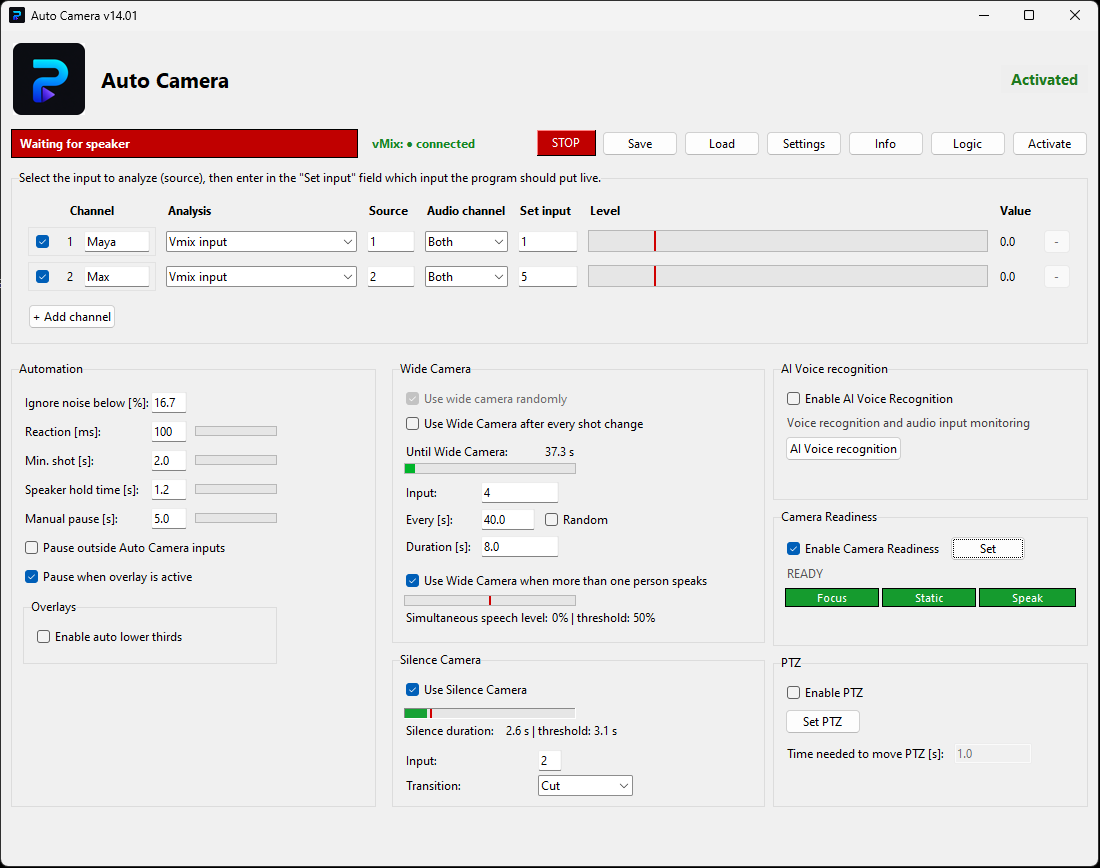
Auto Camera uses microphone activity to decide which camera should be on air. This creates a responsive multicamera mix without requiring constant manual switching.
Configure up to 10 microphone–camera pairs, select the audio source and channel for each speaker, and assign the vMix input that should be shown.
Choose the noise floor, activation threshold, hold time, minimum active time and minimum shot duration to match the rhythm of the conversation.
Auto Camera monitors the configured audio and switches the assigned vMix shot. It can run on another computer on the same network, automatically discover vMix or ATEM, and use wide shots or PTZ presets.
Key features
Handle up to 10 speakers and switch the assigned vMix shot from microphone activity, with adjustable reaction time, hold time and minimum shot duration.
Auto Camera can run on a different computer from vMix and automatically discover vMix or ATEM devices on the same local network.
Pause automation for a chosen time after a manual CUT. It can also stop while an overlay is active or when the director selects an input not assigned to Auto Camera.
Use a wide shot on a timer or random interval, between close shots and when several people speak. During silence, switch to a selected idle camera such as the wide or host shot.
Assign lower thirds to speakers and control when and how often they appear. PTZ presets let Auto Camera automate not only camera cuts but also framing.
AI Voice Recognition can identify speakers by voice characteristics. Camera Readiness checks whether the person is speaking, the image is sharp and the camera is static before taking the shot.
Auto Camera has no feature limits or time limit for non-commercial use and testing. Free and commercial use have the same software features. A subscription is required only for paid work and helps fund continued development.
Questions
It switches cameras based on the person currently speaking, using microphone activity as the control signal.
It is intended for podcasts, interviews, debates and other multicamera vMix productions.
No. Auto Camera includes full functionality and is free without a time limit for non-commercial use and testing.
An active subscription is required only when you use Auto Camera for paid productions, client work or other income-generating activity. The software features remain the same.
For non-commercial use and testing, Auto Camera is free with full functionality and no time limit. If you use it for paid work, activate a commercial license. Have an idea, feedback or a workflow question? Get in touch.