Automatic attenuation
Lower background or programme audio when a priority source becomes active.
vMix audio automation
Ducking Audio lowers selected audio sources when another source becomes active. Keep voice-over, interpretation and programme audio clear without riding every fader manually.
Trial and subscription
The free trial starts when you first run Ducking Audio and includes all features. After 60 days, an active subscription is required to keep using the app. The price is $9.99 per month in USD.
How it works
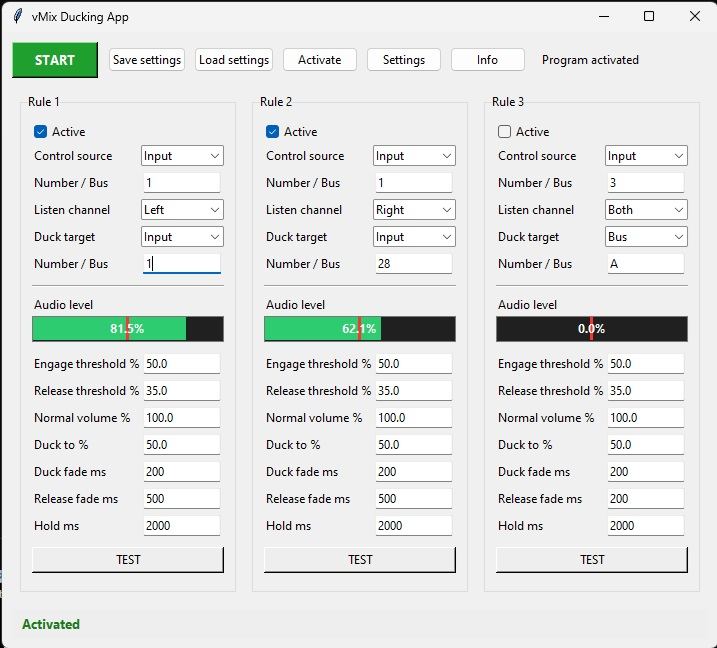
Choose which source should trigger ducking and which source should be lowered. Ducking Audio manages the level change and restores the mix when the trigger is no longer active.
Define the source that should take priority and the sources that should be reduced.
Adjust thresholds, hold time and fade behaviour for the production.
The application lowers and restores the selected audio automatically as activity changes.
Key benefits
Lower background or programme audio when a priority source becomes active.
Tune the threshold, hold and transition times to match the pace of your event.
Apply ducking to the inputs and audio channels relevant to your workflow.
Ducking Audio was created for situations in which one signal should temporarily reduce another. Adjustable timing helps the transition sound deliberate instead of abrupt.
Questions
Audio ducking temporarily lowers one audio source when another, higher-priority source becomes active.
The application provides controls for trigger thresholds, hold time and fade times.
Typical uses include interpretation, voice-over, podcasts, conferences and live events.
No. Plugins For Live develops independent tools for vMix workflows.
Download the 60-day trial and test every feature with the sources you use in production.